How this article was prepared
VPNScout reviews official documentation and public security guidance, then checks material claims during editorial updates. We do not describe a product as hands-on tested unless the article includes the test conditions and results.
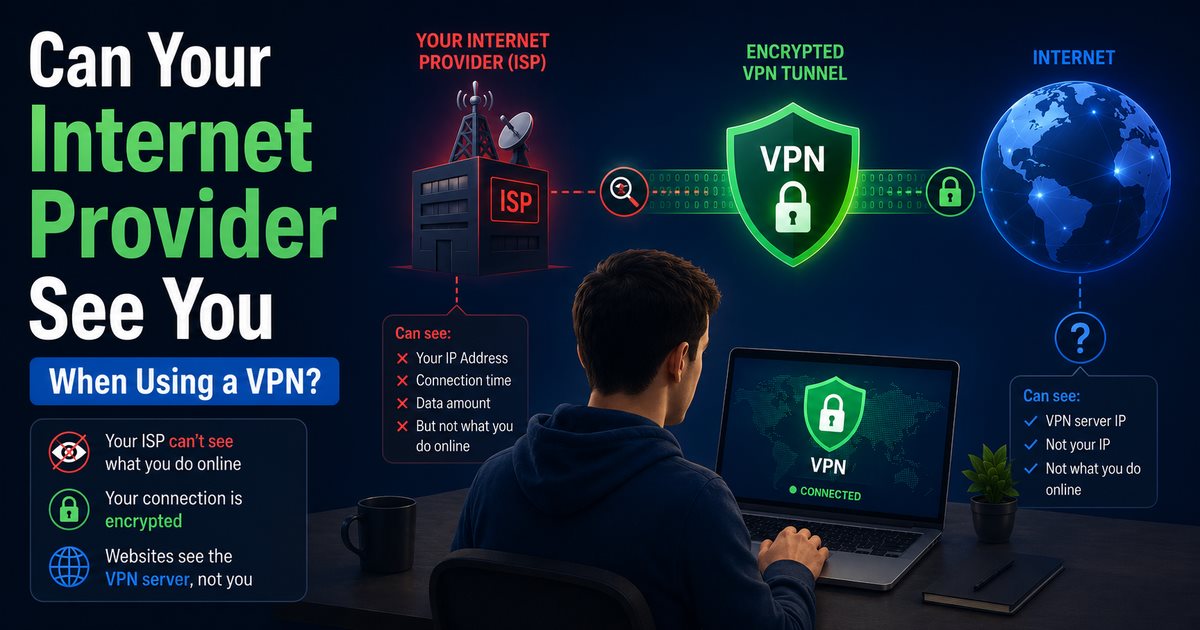
Your internet provider can usually see that you are connected to a VPN, but it normally cannot see the websites you visit, searches you make, or data you exchange inside a correctly configured encrypted VPN tunnel. It can still see your account identity, when you connect, how long you stay online, the amount of data transferred, and the IP address of the VPN server.
That distinction matters. A VPN improves privacy from an internet service provider, but it does not make you invisible or anonymous. It shifts part of the trust from your ISP to the VPN provider, while websites, apps, employers, and account providers may still identify you in other ways.
For practical verification, see what to do when a VPN connects but the IP does not change. If you are choosing a provider, compare the documented strengths and limitations on our VPN comparison page.
| Information | Can your ISP normally see it with a VPN? |
|---|---|
| That your household or device is online | Yes |
| That you are connecting to a VPN server | Usually yes |
| VPN server IP address | Yes |
| Connection time and duration | Yes |
| Approximate amount of data transferred | Yes |
| Individual websites and pages visited | Normally no |
| Search queries inside the VPN tunnel | Normally no |
| Messages, passwords, and page contents | Normally no, provided the traffic stays in the encrypted tunnel |
| DNS requests | Normally no, unless DNS leaks outside the tunnel |
| Traffic excluded through split tunneling | Potentially yes |
The exact metadata available depends on the VPN protocol, network, device, and provider. An ISP may recognize known VPN server addresses or encrypted traffic patterns even though it cannot read the protected activity inside the tunnel.
Your internet provider carries traffic between your home or mobile device and the wider internet. Without a VPN, it can see your subscriber account and public IP address, connection times, data volume, and the destination IP addresses your connection reaches.
HTTPS encrypts the content exchanged with a secure website. That generally prevents an ISP from reading a password, private message, payment details, full page path, or the exact contents of a search. However, HTTPS alone does not necessarily hide all destination information. Traditional DNS requests can reveal the domain names you look up, and destination IP addresses can provide additional clues about the services you use.
The US Federal Trade Commission has reported that ISPs may obtain browsing and app-usage information and can associate network activity with known subscribers. The data an individual provider actually collects, retains, or uses depends on its practices and the law that applies to it.
When a full VPN connection is active, your device encrypts internet traffic before sending it through the ISP. The ISP passes that encrypted traffic to the VPN server. The VPN server then communicates with the requested websites and returns the responses through the encrypted tunnel.
Connection path with a VPN: Device → ISP → VPN server → Website
From the ISP's perspective, the traffic primarily travels between you and the VPN server. It can observe the connection but should not be able to inspect the destinations and contents protected inside it.
Websites see the VPN server's public IP address instead of the public IP address assigned to your home or mobile connection. They may still know who you are if you sign in, accept tracking cookies, provide personal information, or use a device that can be recognized through other signals.
Usually, yes. The ISP can see that you are exchanging encrypted traffic with an IP address operated by or associated with a VPN service. It may also recognize characteristics of common VPN protocols.
Some VPNs offer obfuscated or restrictive-network protocols designed to make VPN traffic less obvious. These features may help on networks that interfere with ordinary VPN connections, but they do not guarantee that an ISP, network administrator, or sophisticated monitoring system cannot detect VPN use.
VPN use is legal in many countries but restricted in some. Check the law that applies where you are located, particularly when traveling. A VPN should not be used to conceal unlawful conduct or bypass rules you are required to follow.
A VPN only protects traffic that actually enters and remains inside the tunnel. These are the most important exceptions.
If the VPN connection drops and the device automatically returns to its normal connection, new traffic can become visible to the ISP. A kill switch is designed to block network access during that gap.
Kill-switch behavior differs between operating systems and VPN applications. Test the setting on each device rather than assuming it is enabled everywhere.
DNS translates a name such as example.com into an IP address. Traditional DNS queries are commonly unencrypted. If the device continues sending them to the ISP's resolver instead of through the VPN, the ISP may see the domains being requested even though other traffic uses the tunnel.
A reputable full-device VPN should route DNS correctly and provide DNS-leak protection. Browser-level secure DNS settings, custom resolvers, and old network configurations can sometimes interact with the VPN, so investigate any unexpected test result carefully.
Split tunneling allows selected applications or destinations to bypass the VPN. This can improve compatibility or performance, but the excluded traffic uses the ordinary ISP connection and receives its usual level of network visibility.
Review the exclusion list whenever privacy from the ISP is the priority. Do not exclude a browser and then assume its activity is inside the VPN.
Some VPN browser extensions operate as proxies for browser traffic rather than protecting the whole device. Other applications, background services, DNS requests, or a second browser may continue using the normal internet connection.
Use the provider's full VPN application when you want system-wide coverage, and confirm exactly what its browser extension protects.
Old manual profiles, conflicting VPN clients, unsupported routers, IPv6 behavior, or security software can affect routing. Keep the VPN application and operating system updated, remove profiles you no longer use, and follow the provider's current setup instructions.
Using a VPN changes which parties can observe different parts of the connection; it does not eliminate every observer.
Because traffic exits through its servers, the VPN provider occupies an important position of trust. Policies and technical practices differ. Read the privacy policy, determine what activity and connection data is retained, and look for credible independent assessments rather than relying only on a “no logs” label.
The FTC advises consumers to research VPN applications, review their permissions, verify that they encrypt traffic, and check whether information is shared with third parties.
Websites can see the VPN server's IP address and anything you intentionally provide. Signing in to Google, a social network, a retailer, or a streaming service identifies the account regardless of the IP address. Cookies, advertising identifiers, payment details, and browser characteristics may also link activity over time.
A commercial VPN does not necessarily hide activity from monitoring software installed on a managed work or school device. The organization may record browser activity, application use, screen contents, or security events directly on the device. Its network may also prohibit personal VPNs.
When using mobile data, the carrier is the internet provider. A full-device VPN limits network visibility in broadly the same way, but the carrier still knows the subscriber, cell-network connection, connection timing, and data usage. It also retains information needed to operate the mobile service.
The VPN company may hold account, subscription, support, or payment-related information even when it says it does not retain browsing activity. “No activity logs” should not be interpreted as “the company knows nothing about the customer.” Read the actual privacy policy for the categories and purposes involved.
No. A VPN is a privacy and security tool, not an anonymity guarantee. It can hide your home IP address from websites and obscure protected activity from the local network and ISP, but it cannot automatically prevent:
The FTC describes this accurately: a VPN can obscure traffic content from an ISP or public Wi-Fi provider, but it does not make the user anonymous.
HTTPS and a VPN protect different parts of the connection and are most useful together.
| Protection | HTTPS | VPN |
|---|---|---|
| Encrypts content between browser and website | Yes | The VPN tunnel covers traffic to the VPN server; HTTPS continues protection to the website |
| Hides your home IP from the website | No | Yes, when traffic uses the VPN |
| Hides destination activity from the ISP | Partially | Generally, when correctly configured |
| Protects all device applications | No | Yes, with a full-device tunnel and no exclusions |
| Makes you anonymous | No | No |
Continue looking for HTTPS even when the VPN is active. A VPN should not be treated as a replacement for website encryption or normal account security.
Use this practical checklist:
No single test proves complete anonymity or confirms every provider claim. These checks verify common routing and DNS problems, not everything happening within a VPN company's infrastructure.
Choose based on documented practices rather than a dramatic promise. Look for:
Free and paid VPNs both require scrutiny. Payment alone does not prove privacy, while a free service still needs a sustainable business model. Determine how the provider funds the service and whether it shares information for advertising or analytics. Use our evidence-based checklist before deciding whether a free VPN is safe, especially on a network you do not control. For travel and shared networks, also review the public Wi-Fi privacy checklist.
Our top recommendation for most readers is NordVPN. Its documented features include DNS-leak protection, multiple modern protocols, and kill-switch controls, although implementation varies by platform. NordVPN also states that its no-logs claims have undergone repeated independent assurance engagements, including a sixth assessment covering its 2025 practices.
Those features address several of the failure points discussed in this guide, but NordVPN still cannot make you anonymous or prevent tracking after you sign in to a website. Review its current privacy policy and platform documentation before deciding whether it fits your needs.
A correctly configured full-tunnel VPN normally prevents the ISP from seeing the websites and page contents carried inside the encrypted tunnel. The ISP can still see connection metadata, and browsing may be exposed if the VPN disconnects, DNS leaks, or an application bypasses the VPN.
The ISP normally cannot read searches sent through the VPN tunnel. The search engine can still associate searches with you if you are signed in or otherwise identifiable.
It can usually determine that you are connecting to a VPN server, and it may associate the server address with NordVPN. It generally cannot read activity protected inside the tunnel.
The ISP can see the IP address receiving the VPN connection and may determine its approximate location or operator. It does not need to know which websites the VPN server contacts on your behalf.
An ISP retains control of your underlying connection and can enforce plan limits or manage congestion. Encryption may prevent content-specific inspection, but a VPN cannot guarantee that throttling will stop or that the connection will become faster.
No. Incognito or private-browsing mode mainly limits what the browser stores locally after the session. It does not create an encrypted VPN tunnel or hide network destinations from the internet provider.
The ISP generally sees encrypted traffic to the VPN rather than the specific activity inside it, but it can still see data volume and connection metadata. A VPN does not make copyright infringement lawful. Follow applicable law and use peer-to-peer technology only for material you are authorized to share.
The answer depends on technical access, provider records, legal authority, device evidence, and jurisdiction. A VPN is not a shield against lawful investigations and should never be represented as one.
Your internet provider can see that you are online and will usually recognize a connection to a VPN server. It can observe timing and data volume, but it normally cannot see the destinations, searches, or contents protected inside a properly functioning full VPN tunnel.
For that protection to hold, traffic must remain in the tunnel. Use a reputable provider, understand its logging policy, enable an appropriate kill switch, check DNS and split-tunneling settings, and remember that accounts and websites can still identify you. A VPN improves connection privacy; it does not make you invisible.